
The Konnect eMail SharePoint Explorer Outlook Add-In comes as a standard .msi installer file with the option to specify command line parameters to have consistent configuration when bulk deploying. Microsoft msiexec.exe tool can be used for bulk deployment and for passing options into installation sequence. Along with Standard Installer Command-Line Options the following parameters can be used to apply configuration.
Note: use the installer version corresponding to the Outlook bit version
Silent install parameters
| Parameter | Values | Default | Comments |
|---|---|---|---|
| ACTIVATION_KEY | XXXX-XXXX-XXXX-XXXX-XXXX | – | Value Type: Alpha Numeric Apply “Activation Key” with the install. Note: The product does not get activated by the installer, but when the application first starts. |
| ENABLE_CATEGORIES | 0 1 | 0 | Value Type: Integer Enable or disable adding category to email when they are saved to SharePoint. Values represent: 0 – Disable 1 – Enable |
| ENABLE_COMPLIANCE_TAGS | 0 1 | 0 | Value Type: Integer Enable or disable support for O365 Compliance Tags in SharePoint. Note: use this parameter only for O365/SharePoint Online. Values represent: 0 – Disable 1 – Enable |
| SAVE_ON_SEND_PROMPT | Ask Always Never | Ask | Value Type: Text Sets the preference for a prompt to save email after sending. Values represent: Ask – will prompt to save email after sending Always – opens a save window as soon as an email is sent Never – do nothing when sending email |
| POST_TO_TEAMS_PROMPT | Ask Always Never | Ask | Value Type: Text Sets the preference for a prompt to post message to Teams Channel after saving. Values represent: Ask – will prompt to share on Teams Channel after saving Always – opens a share via Teams dialog box after saving Never – do nothing after save |
| LIST_VIEW_ROW_LIMIT | 1 ~ 20000 | 5000 | Value Type: Integer Number of list items to display in the list view Note: Value must be greater than 0 and is recommended to be less than 20000 |
| INCLUDE_FOLDERS_IN_LIST_VIEW | 0 1 | 1 | Value Type: Integer Include or Exclude listing folders in list view. Values represent: 0 – Exclude folders 1 – Include folders |
| COPY_OR_MOVE_AS_DEFAULT | Copy Move | Copy | Value Type: Text Sets the preference to move or copy an email when saving to SharePoint. Values represent: Copy – use copy as the default action to save Move – use copy as the default action to save |
| FILE_NAME_TOKENS | One or more of the following tokens can be used: {Subject} {From} {FromName} {Date} {Time} {ConversationId} {ConversationTopic} | {Date}_{Subject} | Value Type: Text Specify a filename format to use when saving email to SharePoint. Example: {Date}-{Subject}-{Time} |
| ATTACHMENT_NAME_TOKENS | One or more of the following tokens can be used: {AttachmentName} {Subject} {From} {FromName} {Date} {Time} {ConversationId} {ConversationTopic} | {Date}_{AttachmentName} | Value Type: Text Specify a filename format to use when saving attachments to SharePoint. Example: {Date}-{AttachmentName}-{Time} |
| FILE_NAME_DATE_FORMAT | DD.MM.YYYY DD-MM-YYYY MM DD YYYY MM.DD.YYYY MM-DD-YYYY YYYY DD MM YYYY MM DD YYYY.DD.MM YYYY.MM.DD YYYY-DD-MM YYYY-MM-DD | YYYY.MM.DD | Value Type: Text Used to specify the date format to use when a date token is used to generate the filename. |
| FILE_NAME_CHARACTER_LIMIT | 10 ~ 140 | 45 | Value Type: Integer Value must be greater than 10 and should be less than 140 |
| SUPRESS_EDIT_FORM_SAVE_ON_SEND | 0 1 | 0 | Value Type: Integer Enable or disable save on send prompt. Values represent: 0 – Disable 1 – Enable |
| EXTRACT_ATTACHMENT_ON_SAVE | 0 1 | 0 | Value Type: Integer Enable or disable extracting attachments while saving. Values represent: 0 – Disable 1 – Enable |
| SHOW_CUSTOM_LISTS_ONLY | 0 1 | 1 | Value Type: Integer Show user created/custom lists and libraries. Values represent: 0 – Disable 1 – Enable |
| EXCLUDE_LISTS | 0 1 | 0 | Value Type: Integer Enable or disable showing lists within SharePoint sites. Values represent: 0 – Disable 1 – Enable |
| ENABLE_CONVERSATION_TRACKING | 0 1 | 0 | Value Type: Integer Enable or disable conversation tracking feature. Values represent: 0 – Disable 1 – Enable |
| EXACT_MATCH_CONVERSATION | 0 1 | 0 | Value Type: Integer Enable or disable exact matching of conversations, used with the conversation tracking feature. Values represent: 0 – Disable 1 – Enable |
Note: If you have already installed the product on the machine and configured settings at least once you have to remove all user-specific settings “xml” files from the “%user%/AppData/Roaming/KonnecteMail/KonnecteMailOutlookAddIn/Settings” folder.
Steps to install/uninstall
- Run command prompt as an administrator
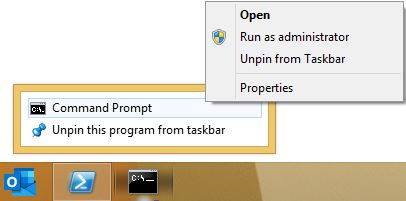
- Execute the “msiexec” command with parameters to install and uninstall the Add-In

Example Usage
msiexec /i KonnecteMailOutlookAddInSetup_v2.0.1.0.msi /quiet ENABLE_CATEGORIES=1 ENABLE_COMPLIANCE_TAGS=0 SAVE_ON_SEND_PROMPT=Ask POST_TO_TEAMS_PROMPT=Ask LIST_VIEW_ROW_LIMIT=5000 INCLUDE_FOLDERS_IN_LIST_VIEW=1 COPY_OR_MOVE_AS_DEFAULT=Copy FILE_NAME_TOKENS={Date}_{Subject} ATTACHMENT_NAME_TOKENS={Date}_{AttachmentName} FILE_NAME_DATE_FORMAT=YYYY.MM.DD FILE_NAME_CHARACTER_LIMIT=45 SUPRESS_EDIT_FORM_SAVE_ON_SEND=0 EXTRACT_ATTACHMENT_ON_SAVE=0 SHOW_CUSTOM_LISTS_ONLY=1 EXCLUDE_LISTS=0 ENABLE_CONVERSATION_TRACKING=0 EXACT_MATCH_CONVERSATION=0 ACTIVATION_KEY=xxxx-xxxx-xxxx-xxxx